Packages Architecture
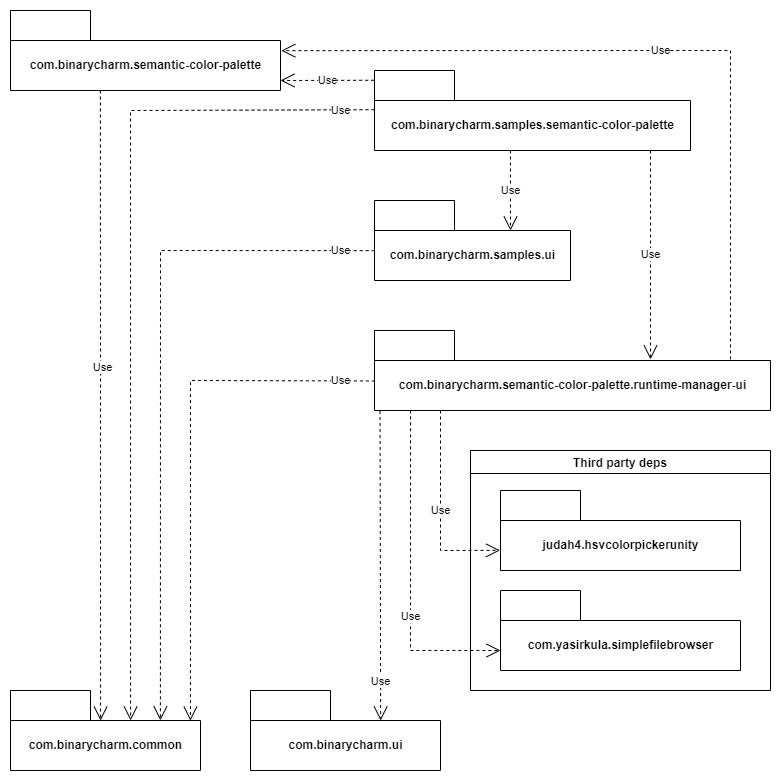
This diagram shows the dependancies between all the included packages:
What does this mean for my projects?
By default, the asset installation installs all the packages shown in the diagram. If you want to keep your projects minimal and tidy, you should only include the packages you actually need.
So, as you can infer from the diagram:
if you only need to use the core
Semantic Color Palettesystem, you should only import packages:com.binarycharm.semantic-color-palettecom.binarycharm.common
if you want to include the
Runtime Manager UIin your projects, which proves useful when you need to provide palette customization features in builds (for example to let an artist tune your palette without installing Unity), you shoul also include packages:com.binarycharm.semantic-color-palette.runtime-manager-uicom.binarycharm.uijudah4.hsvcolorpickerunitycom.yasirkula.simplefilebrowser
if you import the sample project (as described here), you should also include
com.binarycharm.samples.ui
Third party dependences
The Runtime Manager UI uses two packages developed by third parties, and
kindly provided by their authors under MIT license, which allows free
redistribution:
- package
judah4.hsvcolorpickerunityv3.0.2HSV Color pickerby Judah Perez- https://github.com/judah4/HSV-Color-Picker-Unity
- package
com.yasirkula.simplefilebrowserv1.5.7Unity Simple File Browserby Süleyman Yasir KULA- https://github.com/yasirkula/UnitySimpleFileBrowser
For convenience, these packages are included in our Semantic Color Palette
distribution.
In some cases, you might already have these components in your Unity project
because you or other libraries use them.
Depending on many details, different actions will have to be done to handle
that situation avoiding conflicts, but the core idea is that you should have a
single copy of each component, and that copy should be in Packages and not
Assets.
You might have to remove the previously installed copy, or avoid installing the new one, and some assembly definition reference might need to be updated. If you find yourself in troubles and don't know how to deal with these details, we'll be happy to help you if you contact support@binarycharm.com describing throughly your situation.
In the future, hopefully, these external components will be distributed as packages on the Asset Store, the package manager will handle dependencies automatically, and we won't need to ship them together with our system, but will refer to the original, external version.